sâmbătă, 28 ianuarie 2012

How to use a objective-c library in monotouch

There are many nice objective-c libraries out there, and it you would loose precious time to port them in c#/monotouch.  But, with the new LinkWith attribute and the latest Monodevelop & Monotouch you can use a native library very easy.

I took for an example the iCarousel library from here wich is a great image gallery widget.


Ok, so these are the steps required:


- download the objective-c source code of iCarousel


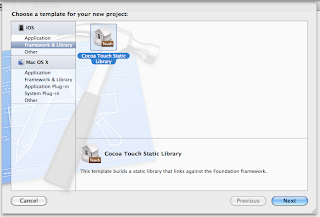
- create a new project in Xcode ( i have Xcode 4.2 ), and call it for example "iCarousel". Choose the Cocoa Touch Static Library project type, like this:
replace the iCarousel.h and iCarousel.m files with the files from the downloaded source code.


Go to project settings.
In the "Build Settings" page, add the "i386" and "armv6" value to Architectures ( it must like like this:
"armv6 $(ARCHS_STANDARD_32_BIT)" )
Also change the "Valid Architectures" to i386 armv6 armv7.
Be sure to also change the "iOs deployment target" to the desired version.


Go to the "Build Phases" and add "-fno-objc-arc" as a value to all header files just under the "Compiler flags" ( apple select all them and press enter ).


Into the Link Binary With Libraries add:
  • CoreGraphics
  • UIKit
  • QuartzCore


You're almost done now.  You need to only add a small script to compile for simulator also.
Insert in RunScript the fallowing script like in this screenshot:


# Version 2.0 (updated for Xcode 4, with some fixes)
# Changes:
#    - Works with xcode 4, even when running xcode 3 projects (Workarounds for apple bugs)
#    - Faster / better: only runs lipo once, instead of once per recursion
#    - Added some debugging statemetns that can be switched on/off by changing the DEBUG_THIS_SCRIPT variable to "true"
#    - Fixed some typos
#
# Purpose:
#   Create a static library for iPhone from within XCode
#   Because Apple staff DELIBERATELY broke Xcode to make this impossible from the GUI (Xcode 3.2.3 specifically states this in the Release notes!)
#   ...no, I don't understand why they did this!
#
# Author: Adam Martin - http://twitter.com/redglassesapps
# Based on: original script from Eonil (main changes: Eonil's script WILL NOT WORK in Xcode GUI - it WILL CRASH YOUR COMPUTER)
#
# More info: see this Stack Overflow question: http://stackoverflow.com/questions/3520977/build-fat-static-library-device-simulator-using-xcode-and-sdk-4

#################[ Tests: helps workaround any future bugs in Xcode ]########
#
DEBUG_THIS_SCRIPT="false"

if [ $DEBUG_THIS_SCRIPT = "true" ]
then
echo "########### TESTS #############"
echo "Use the following variables when debugging this script; note that they may change on recursions"
echo "BUILD_DIR = $BUILD_DIR"
echo "BUILD_ROOT = $BUILD_ROOT"
echo "CONFIGURATION_BUILD_DIR = $CONFIGURATION_BUILD_DIR"
echo "BUILT_PRODUCTS_DIR = $BUILT_PRODUCTS_DIR"
echo "CONFIGURATION_TEMP_DIR = $CONFIGURATION_TEMP_DIR"
echo "TARGET_BUILD_DIR = $TARGET_BUILD_DIR"
fi

#####################[ part 1 ]##################
# First, work out the BASESDK version number (NB: Apple ought to report this, but they hide it)
#    (incidental: searching for substrings in sh is a nightmare! Sob)

SDK_VERSION=$(echo ${SDK_NAME} | grep -o '.\{3\}$')

# Next, work out if we're in SIM or DEVICE

if [ ${PLATFORM_NAME} = "iphonesimulator" ]
then
OTHER_SDK_TO_BUILD=iphoneos${SDK_VERSION}
else
OTHER_SDK_TO_BUILD=iphonesimulator${SDK_VERSION}
fi

echo "XCode has selected SDK: ${PLATFORM_NAME} with version: ${SDK_VERSION} (although back-targetting: ${IPHONEOS_DEPLOYMENT_TARGET})"
echo "...therefore, OTHER_SDK_TO_BUILD = ${OTHER_SDK_TO_BUILD}"
#
#####################[ end of part 1 ]##################

#####################[ part 2 ]##################
#
# IF this is the original invocation, invoke WHATEVER other builds are required
#
# Xcode is already building ONE target...
#
# ...but this is a LIBRARY, so Apple is wrong to set it to build just one.
# ...we need to build ALL targets
# ...we MUST NOT re-build the target that is ALREADY being built: Xcode WILL CRASH YOUR COMPUTER if you try this (infinite recursion!)
#
#
# So: build ONLY the missing platforms/configurations.

if [ "true" == ${ALREADYINVOKED:-false} ]
then
echo "RECURSION: I am NOT the root invocation, so I'm NOT going to recurse"
else
# CRITICAL:
# Prevent infinite recursion (Xcode sucks)
export ALREADYINVOKED="true"

echo "RECURSION: I am the root ... recursing all missing build targets NOW..."
echo "RECURSION: ...about to invoke: xcodebuild -configuration \"${CONFIGURATION}\" -target \"${TARGET_NAME}\" -sdk \"${OTHER_SDK_TO_BUILD}\" ${ACTION} RUN_CLANG_STATIC_ANALYZER=NO"
xcodebuild -configuration "${CONFIGURATION}" -target "${TARGET_NAME}" -sdk "${OTHER_SDK_TO_BUILD}" ${ACTION} RUN_CLANG_STATIC_ANALYZER=NO BUILD_DIR="${BUILD_DIR}" BUILD_ROOT="${BUILD_ROOT}"

ACTION="build"

#Merge all platform binaries as a fat binary for each configurations.

# Calculate where the (multiple) built files are coming from:
CURRENTCONFIG_DEVICE_DIR=${SYMROOT}/${CONFIGURATION}-iphoneos
CURRENTCONFIG_SIMULATOR_DIR=${SYMROOT}/${CONFIGURATION}-iphonesimulator

echo "Taking device build from: ${CURRENTCONFIG_DEVICE_DIR}"
echo "Taking simulator build from: ${CURRENTCONFIG_SIMULATOR_DIR}"

CREATING_UNIVERSAL_DIR=${SYMROOT}/${CONFIGURATION}-universal
echo "...I will output a universal build to: ${CREATING_UNIVERSAL_DIR}"

# ... remove the products of previous runs of this script
#      NB: this directory is ONLY created by this script - it should be safe to delete!

rm -rf "${CREATING_UNIVERSAL_DIR}"
mkdir "${CREATING_UNIVERSAL_DIR}"

#
echo "lipo: for current configuration (${CONFIGURATION}) creating output file: ${CREATING_UNIVERSAL_DIR}/${EXECUTABLE_NAME}"
lipo -create -output "${CREATING_UNIVERSAL_DIR}/${EXECUTABLE_NAME}" "${CURRENTCONFIG_DEVICE_DIR}/${EXECUTABLE_NAME}" "${CURRENTCONFIG_SIMULATOR_DIR}/${EXECUTABLE_NAME}"

#########
#
# Added: StackOverflow suggestion to also copy "include" files
#    (untested, but should work OK)
#
if [ -d "${CURRENTCONFIG_DEVICE_DIR}/usr/local/include" ]
then
mkdir -p "${CREATING_UNIVERSAL_DIR}/usr/local/include"
# * needs to be outside the double quotes?
cp "${CURRENTCONFIG_DEVICE_DIR}/usr/local/include/"* "${CREATING_UNIVERSAL_DIR}/usr/local/include"
fi
fi


Okay.  Now you're ready to make the bindings :)  Just Clean & Build your project, and add the generated library file ( Attention! libiCarousel.a is in the in a folder Debug_universal or Release_universal) to your binding project in monotouch.  Be sure to make the LinkWith attribute look like this:

[assembly: LinkWith ("libiCarousel.a", LinkTarget.ArmV6 | LinkTarget.ArmV7 | LinkTarget.Simulator, ForceLoad = true, Frameworks="CoreGraphics QuartzCore UIKit")]

To make the bindings easier I'm using this little script based on the MonoMac parser class, that takes an objective-c header file and generate a c# binding interface for it.  It's not perfect, but it help's a lot.

After you make the binding interface, build your project, and the fresh new generated dll file in your projects :)

Happy coding!


joi, 19 ianuarie 2012

Tapjoy publisher library for MonoTouch

Hello there monotouch users,

Tapjoy is a wonderful platform, but unfortunately they have not developed a library for monotouch users. And since C # is 10 times more beautiful and better for RAD than Objective-C, I decided to make it myself.

Basically I took the publishers library for XNA, and I adapted it for monotouch.

I hope this is helpful!

Download sources here.

Sample:
TapjoyConnect.Instance.TapjoyConnectCompleted += delegate(object sender, TapjoyConnectCompletedEventArgs e) 
{
 if( e.Succeeded )
  Console.WriteLine("tapjoy succeeded!");
 else
  Console.WriteLine("error; check your app id or secret key");
};
TapjoyConnect.Instance.RequestTapjoyConnect( APP_ID , SECRET_KEY );


vineri, 13 ianuarie 2012

How to compile Sparrow for Monotouch


Download the bindings from
https://github.com/trustme/Sparrow

and inside the folder with the bindings run these commands:


  • /Developer/MonoTouch/usr/bin/btouch sparrow.cs -s:enum.cs --outdir=gen -ns=Sparrow --unsafe --sourceonly=genfiles
  • /Developer/MonoTouch/usr/bin/smcs -out:sparrow.dll `cat genfiles` extensions.cs -unsafe -r:/Developer/MonoTouch/usr/lib/mono/2.1/monotouch.dll enum.cs -target:library

marți, 2 august 2011

A MonoTouch class for resize maintaining aspect ratio or crop your images

Hy guys,

I wrote a c# class for a personal project, and I'm sure it will be useful for you to. Very often we need to quickly resize an UIImage, using Thumb Resize maintaining aspect ratio or Crop Resize...

A quick example to crop and resize an image from 768x507 to 300x300:
//load a test image, with size: 768x507
UIImage img = UIImage.FromFile("test.jpg");
//initiate the resizer class
ImageResizer resizer = new ImageResizer(img);
//crop resize 
resizer.CropResize( 300,300 );
//and that's it! The image is resized & croped to exactly 300x300
UIImage croppedImage = resizer.ModifiedImage;

Or resize maintaining ratio to a maximum of 200x200:
//load a test image, with size: 768x507
UIImage img = UIImage.FromFile("test.jpg");
//initiate the resizer class
ImageResizer resizer = new ImageResizer(img);
//crop resize 
resizer.RatioResize( 200,200 ); //now it has 200x132
//and that's it! 
UIImage croppedImage = resizer.ModifiedImage;

Also you can scale it to 120% for example
//load a test image, with size: 768x507
UIImage img = UIImage.FromFile("test.jpg");
//initiate the resizer class
ImageResizer resizer = new ImageResizer(img);
//crop resize 
resizer.Scale( 120 ); //now it has 922x608
//and that's it! 
UIImage croppedImage = resizer.ModifiedImage;

So, here it is!

using System;
using MonoTouch.UIKit;
using System.Drawing;
using MonoTouch.CoreGraphics;
namespace Test
{
 public enum CropPosition
 {
  Start, Center, End
 }
 
 public class ImageResizer
 {
  UIImage initialImage  = null;
  UIImage modifiedImage = null;
  
  public ImageResizer ( UIImage image )
  {
   this.initialImage         = image;
   this.modifiedImage = image;
  }
  
  
  /// <summary>
  /// strech resize
  /// </summary>
  public void Resize( float width, float height )
  {
   UIGraphics.BeginImageContext( new SizeF( width, height ) );
   //
   modifiedImage.Draw( new RectangleF( 0,0, width, height ) );
   modifiedImage = UIGraphics.GetImageFromCurrentImageContext();
   //
   UIGraphics.EndImageContext();
  }
  
  public void RatioResizeToWidth( float width )
  {
   Console.WriteLine("resize to width: " + width  );
   var cur_width = modifiedImage.Size.Width;
   if( cur_width > width )
   {
    var ratio  = width / cur_width;
    var height = modifiedImage.Size.Height * ratio;
    //resize
    Resize( width, height );
   }
  }
  
  public void RatioResizeToHeight( float height )
  {
   Console.WriteLine("resize to height: " + height  );
   var cur_height = modifiedImage.Size.Height;
   if( cur_height > height )
   {
    var ratio = height / cur_height;
    var width = modifiedImage.Size.Width * ratio;
    //
    Resize( width, height );
   }
  }
  
  /// <summary>
  /// resize maintaining ratio
  /// </summary>
  public void RatioResize( float max_width, float max_height )
  {
   if( max_width > max_height )
   {
    RatioResizeToWidth ( max_width  );
    RatioResizeToHeight( max_height );
   }
   else
   {
    RatioResizeToHeight( max_height );
    RatioResizeToWidth ( max_width  );
   }
  }
  
  /// <summary>
  /// scaling the image with a given procent value
  /// </summary>
  public void Scale( float procent )
  {
   var width  = modifiedImage.Size.Width  * (procent / 100);
   var height = modifiedImage.Size.Height * (procent / 100);
   Resize( width, height );
  }
  
  /// <summary>
  /// default crop resize, set on center
  /// </summary>
  public void CropResize( float width, float height )
  {
   CropResize(width, height, CropPosition.Center );
  }
  
  /// <summary>
  /// resize and crop to a specific location
  /// </summary>
  public void CropResize( float width, float height, CropPosition position )
  {
   SizeF ImgSize = modifiedImage.Size;
   //
   if( ImgSize.Width  < width  ) width  = ImgSize.Width;
   if( ImgSize.Height < height ) height = ImgSize.Height;
   //
   float crop_x = 0;
   float crop_y = 0;
   if( ImgSize.Width / width < ImgSize.Height / height )
   {
    //scad din width
    RatioResizeToWidth( width );
    ImgSize = modifiedImage.Size;
    //compute crop_y
    if( position == CropPosition.Center ) crop_y = (ImgSize.Height / 2) - (height / 2);
    if( position == CropPosition.End    ) crop_y = ImgSize.Height - height;
   }
   else
   {
    //change height
    RatioResizeToHeight( height );
    ImgSize = modifiedImage.Size;
    //calculeaza crop_x
    if( position == CropPosition.Center ) crop_x = (ImgSize.Width / 2) - (width / 2);
    if( position == CropPosition.End    ) crop_x = ImgSize.Width - width;
   }
   //create new contect
   UIGraphics.BeginImageContext( new SizeF( width, height ) );
   CGContext context =  UIGraphics.GetCurrentContext();
   //crops the new context to the desired height and width
   RectangleF clippedRect = new RectangleF( 0, 0, width, height );
   context.ClipToRect(clippedRect);
   //draw my image on the context
   RectangleF drawRect = new RectangleF( -crop_x, -crop_y, ImgSize.Width, ImgSize.Height );
   modifiedImage.Draw( drawRect );
   //save the context in modifiedImage
   modifiedImage = UIGraphics.GetImageFromCurrentImageContext();
   //close the context
   UIGraphics.EndImageContext();
   
  }
 

  public UIImage InitialImage 
  {
   get 
   {
    return this.initialImage;
   }
  }

  public UIImage ModifiedImage 
  {
   get 
   {
    return this.modifiedImage;
   }
  }
 }
}
 

marți, 5 iulie 2011

A corona lua multi-touch pinch-zoom example


I found that the pinch zoom example in here was a little harder to understand, so I decided to make my own class to handle pinch-zoom events:

It's simple to use, just do something like:
--hide the statusbar
display.setStatusBar( display.HiddenStatusBar )

--include the mtouch library
local mtouch = require( "mtouch" )

--create the zoom object - an image
local image     = nil

local function OnZoomIn( event )
 --grow our image
 image.xScale = image.xScale * 1.01
 image.yScale = image.yScale * 1.01
 print("new width="..image.contentWidth)
end

local function OnZoomOut( event )
 --shrink our image
 image.xScale = image.xScale / 1.01
 image.yScale = image.yScale / 1.01
 print("new width="..image.contentWidth)
end

local function main()
 --add the image
 image = display.newImage("image.jpg" )
 --set the imaage to the center of the device
 image.x = display.contentWidth  * 0.5
 image.y = display.contentHeight * 0.5
 --create the pinch zoom over our image
 mtouch.setZoomObject( image )
 mtouch.setOnZoomIn  ( OnZoomIn  ) 
 mtouch.setOnZoomOut ( OnZoomOut  )
 --add the fictive touch for the simulator - comment this if you are deploying to device!
 mtouch.setFictiveSimulatorTouch( 100, 100 )
end

main()

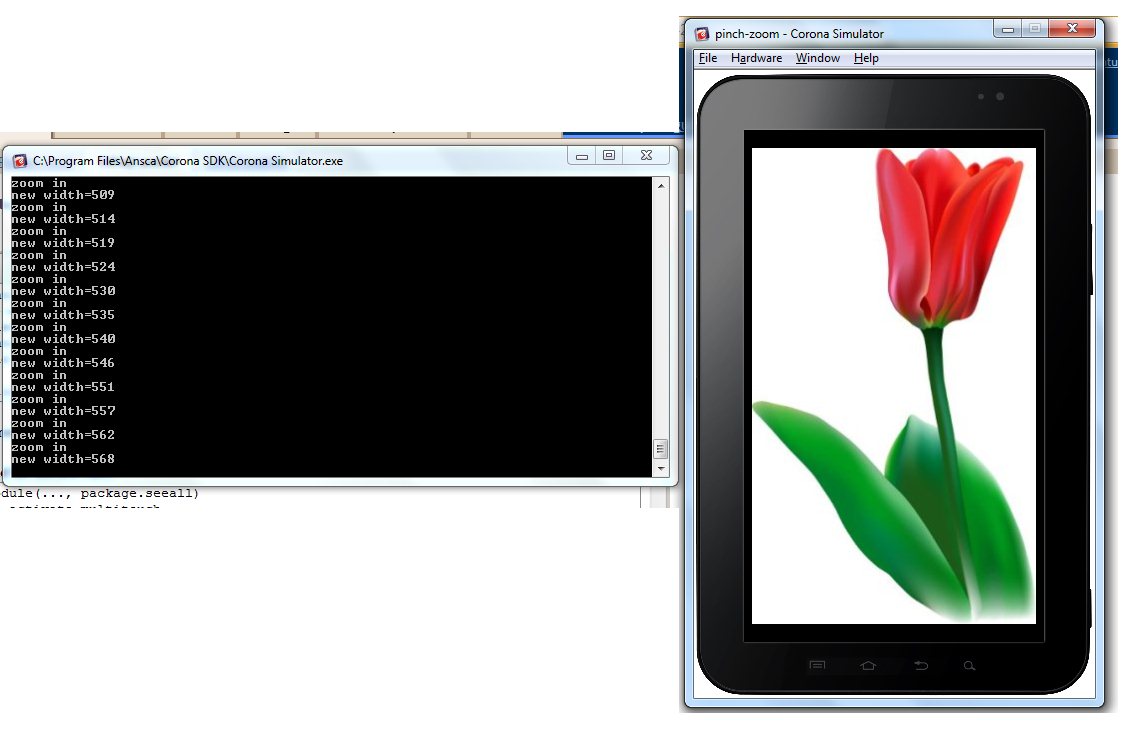
Screenshot:


And the mtouch class:
module(..., package.seeall)
-- activate multitouch
system.activate( "multitouch" )

-- math helpers
local sqrt         = math.sqrt
local abs     = math.abs
-- current touches
local touches      = {}
-- last zoom distance - I use this to compare with current distance
-- if its smaller then zoom out, else  zoom in
local lastDistance = 0
local zoomObject   = nil      --the zoom object
local OnZoomIn     = nil      --the zoom in event
local OnZoomOut    = nil      --the zoom out event
--fictive touch
local fictiveTouch = {}
fictiveTouch.id = "QHHJGL10"

-----------------------------------------------
-- counts a dictionary
-----------------------------------------------
local function CountDictionary(dict)
 local ret = 0
 for k, v in pairs(dict) do
  ret = ret + 1
 end
 return ret
end

-----------------------------------------------
-- returns an element at some index in a dictionary
-----------------------------------------------
local function GetDictElAtIndex( dict, index )
 local temp = 0
 local ret  = nil
 for k, v in pairs(dict) do
  if( temp == index ) then
   ret   = v
   break
  end
  temp   = temp + 1
 end
 return ret
end

-----------------------------------------------
-- update x and y for a specific touch-event
-----------------------------------------------
local function UpdateTouch( event )
 local id  = event.id
 local obj = event.target
 local  x  = event.x
 local  y  = event.y
 if touches[id] then
  touches[id].x = x
  touches[id].y = y
 end
end

-----------------------------------------------
-- calculate the distance between two touches 
-----------------------------------------------
local function DistanceBetween2T( t1, t2 )
 local ret = 0
 local deltax = t2.x - t1.x
 local deltay = t2.y - t1.y
 ret          = sqrt( deltax * deltax + deltay * deltay )
 return ret
end
-----------------------------------------------
-- touch listener
-----------------------------------------------
function on_touch( event )
 local ret = false
 if     event.phase == "began" then
  --register this touch
  touches[ event.id ] = event
 elseif event.phase == "moved" then
  UpdateTouch(event)
  --verify if i have at least 2 touches
  if( CountDictionary(touches) >= 2 ) then
   zoomObject.touching = true
   --gets the first 2 touches and calculate the distance between them
   local touch1 = GetDictElAtIndex( touches, 0 )
   local touch2 = GetDictElAtIndex( touches, 1 )
   local dist   = DistanceBetween2T( touch1, touch2 )
   --
   local args        = {}
   args.distance     = dist
   args.lastdistance = lastDistance
   args.difference   = abs( lastDistance - dist )
   args.touch1       = touch1
   args.touch2       = touch2
   if lastDistance ~= -1 then
    if dist < lastDistance then 
     --zoom out
     if OnZoomOut ~= nil then OnZoomOut( args ) end
    else
     --zoom in
     if OnZoomIn  ~= nil then  OnZoomIn( args ) end
    end
    ret = true
   end
   --save the lastdistance
   lastDistance = dist
  end
 elseif event.phase == "ended" then
  --remove this touch from list
  touches[ event.id ]  = nil
  lastDistance    = -1
  zoomObject.touching = false
 end
 return ret
end

-----------------------------------------------
-- properties
-----------------------------------------------
function setZoomObject( obj )
 zoomObject          = obj
 zoomObject.touching = false
 -- register table listener
 zoomObject:addEventListener( "touch", on_touch )
end


-----------------------------------------------
-- returns current zoom object
-----------------------------------------------
function getZoomObject() 
 return zoomObject
end

-----------------------------------------------
-- returns the number of current touches
-----------------------------------------------
function getNrTouches() 
 return CountDictionary(touches)
end

-----------------------------------------------
-- sets the zoomin event function
-----------------------------------------------
function setOnZoomIn( event )
 OnZoomIn = event
end

-----------------------------------------------
-- sets the zoomout event function
-----------------------------------------------
function setOnZoomOut( event )
 OnZoomOut = event
end

-----------------------------------------------
-- for the simulator: create a fictive touch
-----------------------------------------------
function setFictiveSimulatorTouch( x, y)
 fictiveTouch.x = x; fictiveTouch.y = y
 touches[ fictiveTouch.id ] = fictiveTouch
 fictiveTouch.rect = display.newRect( fictiveTouch.x, fictiveTouch.y, 20, 20 )
end

-----------------------------------------------
-- for the simulator: removes a fictive touch
-----------------------------------------------
function removeFictiveSimulatorTouch()
 touches[ fictiveTouch.id ] = nil
 fictiveTouch.rect:removeSelf()
end

-----------------------------------------------
-- clean me
-----------------------------------------------
function clean()
 zoomObject:removeEventListener( "touch", on_touch )
end